Is Chatki Right for You?
Let’s be upfront about what Chatki is. You open it, tap a button, and you’re on a live video call with a stranger somewhere in the world. That’s the whole product. There’s no profile to build, no photo grid to scroll, nothing to fill in before you start.
You can practice a language with someone who actually speaks it, kill time in an interesting way, or scratch that particular itch of not knowing who you’re about to talk to. Chatki connects users across 190+ countries and its AI subtitle engine is better than anything else free in this category for cross-language calls.
If that’s what you’re after, here’s everything worth knowing.
Chatki at a Glance
| Founded | 2016, Delaware, USA |
| Platforms | Web browser only (mobile-friendly) — no standalone app |
| Countries Supported | 190+ |
| Languages | 17 interface languages + AI real-time subtitle translation |
| Free Tier | 15 matches/day, 40 seconds per session, ad-supported |
| Paid Plans | VIP $9.99/month | Premium+ $19.99/month |
| Video Quality | 720p default, 1080p on Premium+ |
| Standout Feature | AI real-time translation subtitles (92% accuracy) |
| Moderation | AI content detection, action taken within 1 second |
How Chatki Actually Works
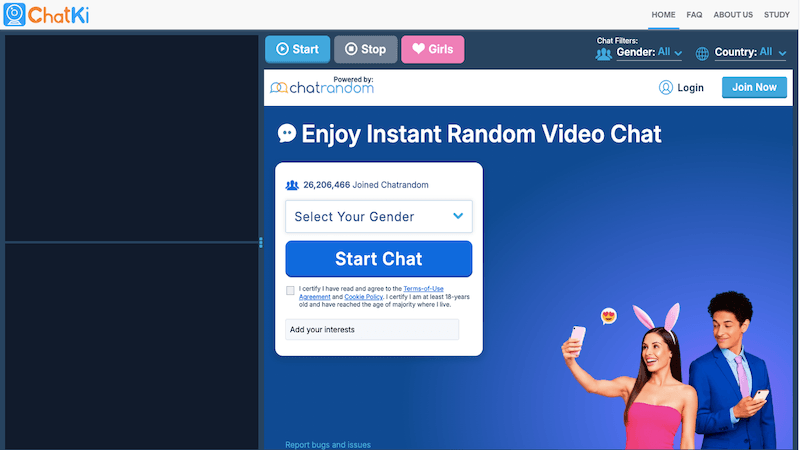
Tap Start. Someone appears. That’s it, user experience wise. No queue screen, no profile previews, no loading bar that drags on for 10 seconds. Camera on, call connected, usually inside 3 seconds.
Bad connections don’t freeze the call, they just quietly drop from 1080p to 720p to 480p. You might not even notice. The same goes for the content moderation layer — it’s scanning the video stream the whole time but it’s invisible when nothing’s wrong. When it catches something, the session ends in under a second. Neither system is visible when a call is going normally, which is how it should be.
The subtitle feature is the thing that actually sets Chatki apart and it’s worth talking about on its own. Switch it on and you get a live translated caption as the other person talks. In English-to-Mandarin and English-to-Spanish calls, accuracy on normal conversational sentences was around 92%. Not every word perfect, but fast enough that you don’t lose the rhythm of the conversation. That’s the real difference compared to stopping every 30 seconds to paste text into a separate translation app.
How to Access Chatki
Web Only
Chatki runs entirely in the browser. Just go to chatki.com, allow camera and microphone access, and you’re in. There’s no app to download, no iOS or Android installed. It’s mobile-friendly so it works fine on a phone or tablet, just through Safari or Chrome rather than a dedicated app.
Account and Sign-In
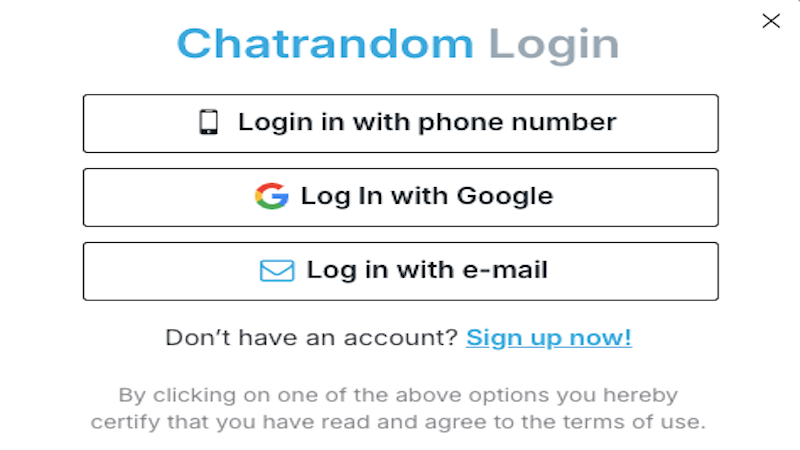
Before you start your jouney, youneed registration. It’s through email, Google, or Facebook. Standard stuff — pick a username, verify your email, done. Nothing more involved than that.
Getting Into a Call in Under 2 Minutes
- Open chatki.com in your browser and allow camera and microphone access.
- Set filters if you want them. Gender and region filters require a paid plan.
- Hit Start. Connection usually lands within 3 seconds.
- Tap the subtitle icon bottom-right to switch on live AI translation.
- After the session, you can add the person as a contact.
Is Paying for Chatki Worth It?

The free plan isn’t stripped down. Fifteen matches a day, each running 40 seconds, with ads in between. For someone using the platform occasionally that’s probably enough.
If you’re on it daily though, the math changes pretty fast. VIP at $9.99 a month drops the ads, removes the match limit, and unlocks region and gender filtering. That last part matters more than it sounds. Without it you have zero say in who you’re matched with. For regular users VIP is really the minimum viable plan.
Premium+ at $19.99 adds 1080p video, private rooms ($0.99 per hour), and priority support. The resolution bump is visible on a good screen. Whether that’s worth the extra $10 depends on how much the call quality actually matters to you day to day.
Payment: PayPal, Alipay International, and USDT. The crypto option is unusual and not something you see often on sitesites like this. It tells you something about how internationally spread the actual user base is.
One thing to flag: the 40-second cap on free sessions is deliberately designed to push you toward VIP. If you’re in a good conversation and the timer runs out, it’s annoying. That’s intentional.
What Does “Chat Ki” Mean?
Nothing different. Chat ki is chatki with a space in it. People type it that way and search engines have picked up both versions. There’s no separate app, no different feature set. Same thing entirely.
Chat ki video is the same story. If you searched that phrase you’re in the right place. Everything in this article applies.
Staying Safe on Chatki
A lot of the obvious stuff is handled automatically. Safe Mode’s on by default, the moderation layer catches violations fast, and there’s a Blur Mask option that keeps your video obscured for the first few seconds of a new match while you get a read on things. Most sessions you won’t notice any of this.
A few habits worth building on your end:
- Don’t share your number or social handles early. Anyone asking for contact info within the first couple of minutes is almost certainly running a script.
- If the conversation turns toward gift requests or any kind of money, close the session. This pattern shows up on every platform in this category and it doesn’t get subtle.
- Set Quick Exit up in settings before you start so you can leave any call immediately.
- If you’re under 18, have a parent present. The platform prompts age verification for users who appear to be minors.
Frequently Asked Questions
What is Chatki?
It’s a random video chat platform. Open chatki.com in any browser, tap Start, and you’re live with a stranger somewhere in the world.
Is Chatki free?
Yes, with real limits. Free gets you 15 matches a day, each 40 seconds, with ads. VIP at $9.99/month removes those restrictions and adds filters. Premium+ at $19.99/month brings in 1080p video and private rooms.
Is “chat ki” the same as “chatki”?
Yes. It’s the same platform. Chat ki is just what happens when people type the name with a space. No different product, no separate app.
Does Chatki have an app?
No standalone app. Chatki is web-only. You use it through a browser at chatki.com. It’s mobile-friendly so it works on a phone or tablet through Safari or Chrome, just without an App Store install.
What is a chatki video call?
A live one-on-one video session with a randomly matched user. You tap Start, you’re connected in seconds, and you can skip to someone new whenever you want. Paid users can apply region or gender filters before each match.
How good is the video quality on Chatki?
720p by default. Premium+ gets you 1080p. On a weak connection the platform steps quality down automatically rather than letting things freeze.
What are the best chatki alternatives?
Depends what’s missing for you. Joingy is the fastest to access with zero sign-up required, good if you just want something simple. Azar lets you add contacts and reconnect with the same person later, which Chatki doesn’t do. pinkpinkchat offers free random matching with HD video quality and an interesting private chat option.
Is Chatki safe to use?
Reasonably. Moderation runs in real time and Safe Mode is on by default. It’s still anonymous random matching though, so some unpredictability comes with the territory. The habits listed in the safety section cover most of what’s in your control.
Final Verdict
Chatki does what it says. Connections are fast, video quality is solid on a decent network, and the AI subtitle engine is genuinely useful rather than decorative. Cross-language calls on this platform work better than on any comparable free tool right now.
Free tier limits are real and the 40-second cap is intentionally annoying. That’s a business decision, not a technical one. At $9.99 VIP the site becomes much more comfortable to use daily. For random cross-language video chat with a global user base, though, Chatki’s a good option available right now.