What Is FaceFlow?
FaceFlow is a free website for video chat and online meeting. You can meet new people in random one-on-one chats or join public rooms. Also, You can make your own room for group calls. This makes it a fun mix of a place to make friends and a basic meeting tool. It works right in your web browser. No downloads.
Core Features At A Glance
- Random partner matching for quick one-to-one chats.
- Public chat rooms based on your location.
- Unlimited group video calls and web conferences.
- No downloads or plugins required for modern browsers.
- Friends list for saving and repeating conversations.
- Simple room links for inviting non-members and guests.
FaceFlow Login: How To Get Started
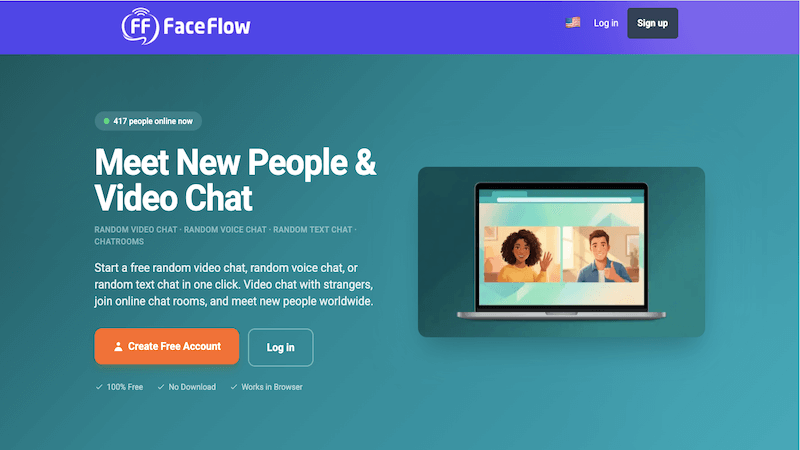
It’s easy to join FaceFlow. You can sign up with an email or or skip the wait by linking a Google or Facebook account. Want to look around first? Join as a guest. No full profile needed.
- A quick note for mobile users: You won’t find a dedicated FaceFlow app to download. Instead, the developers optimized the entire site for standard mobile browsers like Chrome and Safari. You can chat on the go without taking up storage space.
Random Faceflow Chat: One-On-One
Looking for a quick 1v1 chat? The random feature connects you with new people instantly. Hit “Start,” and you’ll meet someone new in seconds.
Not ready for the camera? You can easily switch to text mode to keep things low-key. And if a chat ever feels weird or boring, simply click “Next” to find a new partner right away.
Plus, you can always tweak your settings before connecting. You can pick a different mic or mute yourself with just a click.
Join Or Create Public Rooms
FaceFlow has public chat rooms that feel like digital hangouts. Just scroll through the open rooms or use a link to get in. You can find locals or people into the same stuff as you.
Want to host your own? You can easily create a public room and share the link.
Plus, you can join any room just to listen first and only have to turn on your video when you’re fully ready to talk.
Group Video Calls & Collaboration
Setting up a group chat only takes a few clicks.
- Click “Create Room.”
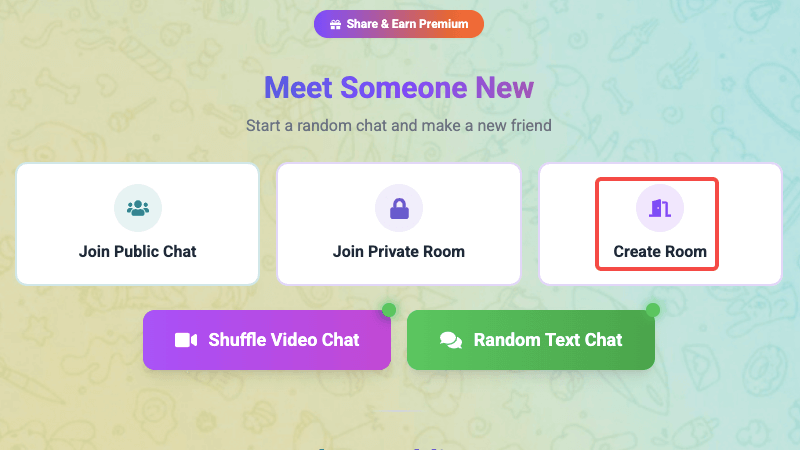
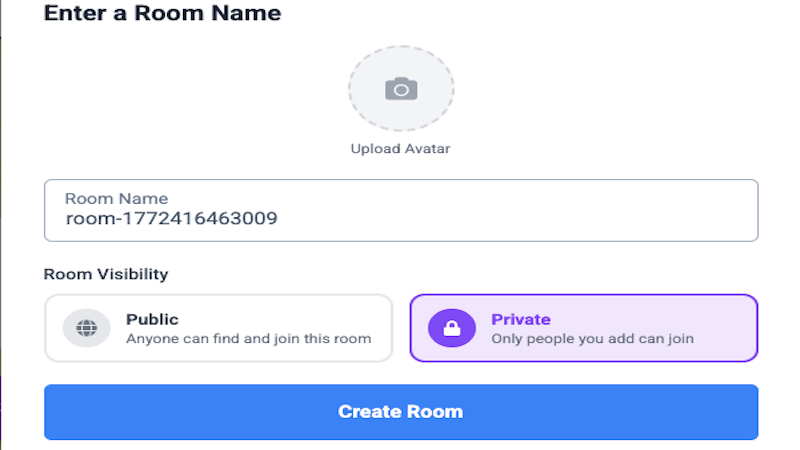
- Select the “Private” option and click “Create Room” again.
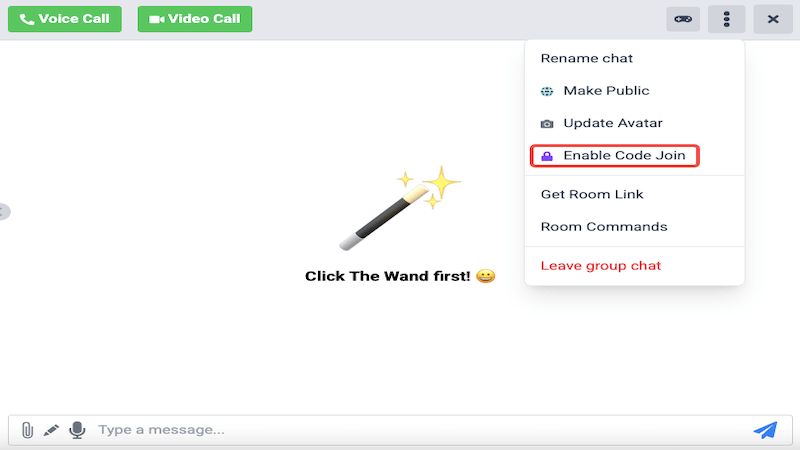
- Click the menu icon and select “Enable Code Join.”
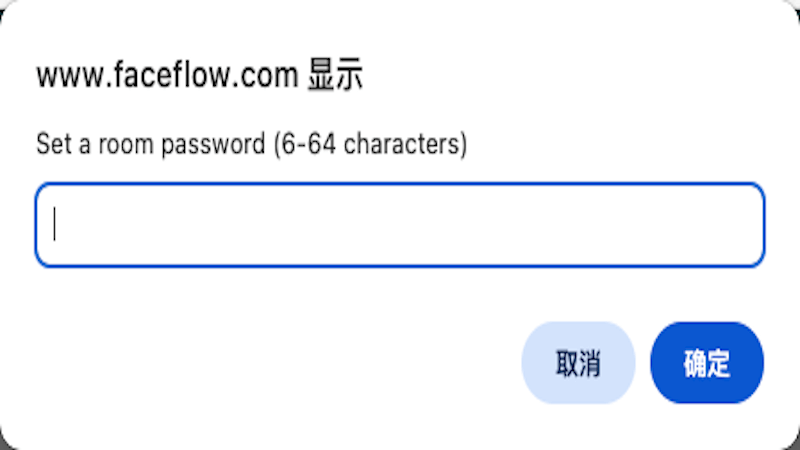
- Set a password.
- Select “Get Room Link” and share the URL with your friends or group.
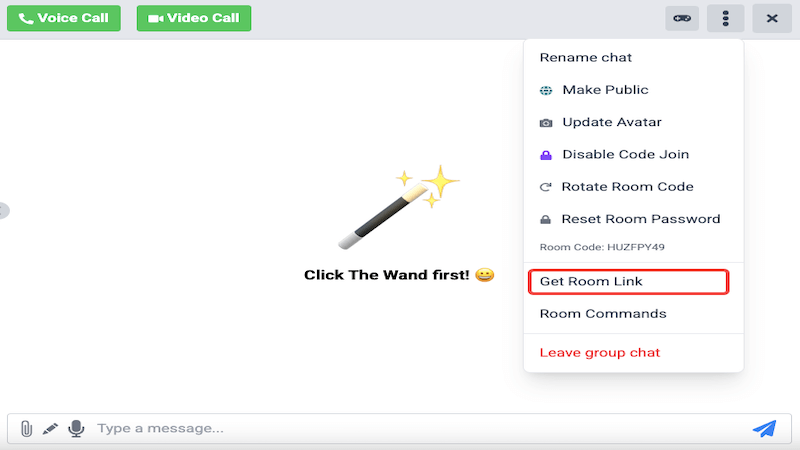
Once you’ve shared the link, anyone with the password can jump right into the call. You can also add frequent users to your friends list for easier access later.
Friends And Profiles
Click with someone in a chat? Just send a friend request so you don’t lose touch when you close the tab. Once they accept, you can call them directly—no more searching for room links.
Setting up a profile is super basic. You can add a photo and a quick bio, but honestly, a lot of users just leave it completely blank.
Safety And Real Risks
Here is where you actually need to be careful. FaceFlow does not use check IDS, so fake accounts and scammers are pretty common.
- Reporting: You can easily “Ignore” or “Block” someone. Just know the site itself isn’t actively catching bad behavior behind the scenes for you.
- Content: You might run into some weird stuff, because it is a free and open platform. Watch out for “bots” dropping sketchy links in public rooms.
- Pro Tip: Keep your camera off until you feel totally safe. And never, ever share personal data like your phone number or address.
Pricing And Premium Perks
FaceFlow is 100% free for its core features. It stays free by showing ads on the site. Want a cleaner look? You can upgrade to Premium to ditch the ads and get unlimited friend requests.
- The Hack: Click “Get Premium” and scroll all the way to the bottom. There will be a “Get Free Premium” button. Just view a short ad, and you can unlock 24 hours of Premium(once per day).
Frequently Asked Questions
What can I do on FaceFlow?
It is a simple site to meet people. You can jump into a random video chat, join public rooms, or start group calls. It works for both meeting strangers and hanging out with friends.
Is FaceFlow safe?
You stay safe by being careful. Use a nickname and keep your personal info private. The site is wide open, so definitely keep an eye out for bots or fake accounts.
Where is the mobile app?
You won’t find an app in the App Store or Google Play. Instead, just open faceflow.co in your phone’s browser.
Is FaceFlow really free?
Yes, the core features are totally free. You will see some ads, but that is how the site stays running. Everyday , you can watch a 5-second ad to get 24 hours of Premium perks for free.
Do I need an account?
Nope, not at all. Just hop in as a guest to look around first. Making a real account is really only for saving your friends list or checking old messages.
How do I start a private call?
Add the person as a friend first. When they accept, you can start a private 1v1 chat directly from their profile.
What if someone is being rude?
Hit “Report” or “Ignore” right away. This blocks them instantly. If a chat ever feels off, trust your gut—just leave and find a new match.
What are some good FaceFlow alternatives?
Check out Y99 for chat rooms or Fox Video Chat for quick matches. For a safer private call, definitely try Pink Pink Chat.
Why is my camera or mic not working?
Check your browser first. Make sure you hit “Allow” when the site asks to use your camera. Also, close any other apps (like FaceTime or Zoom) . They might be hogging your camera.